
Find My Phone by Clap Launcher
AtomApplicationsTools
4.512.66K Reviews
- Version
- 2.2.2
- Installs
- 1.00M
- Age Rating
- Everyone
Screenshots
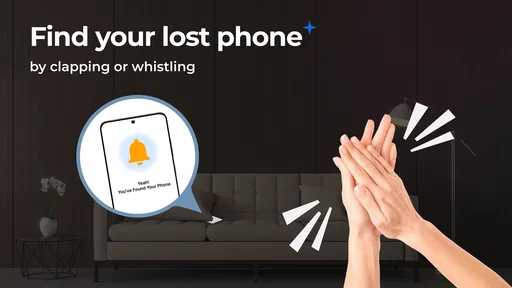
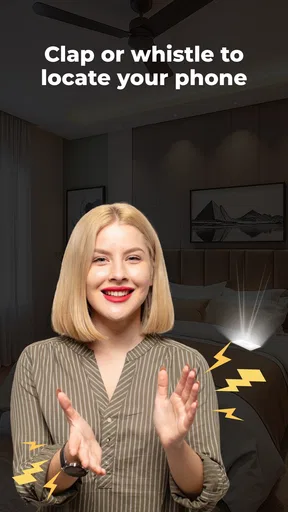
Our Review of Find My Phone by Clap Launcher
 Analysis by Appyee
Ever misplaced your phone in a sea of couch cushions or under a pile of laundry? It’s a modern-day nightmare we’ve all faced. Enter Find My Phone by Clap Launcher, an app that sounds almost too good to be true. I decided to give it a whirl to see if it really could save the day when my phone decides to play hide and seek.
Why a Small Search Can Waste So Much Time
The frustrating part of losing a phone at home is often not the distance but the uncertainty. I can remember setting mine down while carrying groceries, then checking the kitchen, hallway, and bedroom because I could not recall where I had paused. A tool that lets me trigger a sound from nearby can shorten that search, especially when the phone is hidden from view but still within hearing range.
This is the particular problem this app is built around: finding a misplaced phone by making a sound or whistle to prompt it to respond. It is a useful distinction from a map-based locator. A map can help when a device is somewhere across town; a clap-triggered finder is aimed at the familiar, small-scale hunt around a home, office, or bag. I see it as a convenience for everyday mix-ups, not as a replacement for a full lost-device service.
Setting It Up
Getting started with Find My Phone by Clap Launcher is a breeze. After a quick download from the app store, you're greeted with a simple setup process. The app guides you through a few steps to calibrate your phone to recognize your clap. It’s like training a little digital puppy—adorably easy and surprisingly responsive. I found the setup to be intuitive, with the app offering tips to ensure it catches your unique clap rhythm.
A Sensible First Test
I would not wait until a rushed morning to find out whether the trigger works reliably in my space. After setup, it makes sense to put the phone down in a few ordinary places and test the response from where I would naturally search: another room, the sofa, or a coat pocket. That quick rehearsal helps me learn how loud I need to clap and how the alert sounds in my home. It also shows whether a particular room or background noise makes detection less dependable.
There is a practical trade-off in tuning any sound-triggered tool. A setting that is eager to respond may be more convenient when I am searching, but it could also be more likely to react to unrelated noise. A less eager setting may reduce accidental triggers but require a more deliberate clap. I would choose a middle ground first, then adjust only after noticing a real problem rather than trying to make it maximally sensitive from the start.
How It Works
The magic lies in the app’s ability to detect sound patterns. Once you’ve clapped, your phone lets out a series of sounds or vibrations, making it easier to locate. It’s like a game of Marco Polo but with your smartphone. I tested it in various scenarios, from the depths of my backpack to the chaos of a party, and it worked like a charm every time.
Thanks to its clever use of the phone’s microphone, the app doesn’t chew through your battery life, which is always a plus. Let’s face it, no one wants an app that drains more juice than it’s worth.
The same basic idea also explains when it is less useful. A sound-based finder needs the phone to be close enough for its response to help me narrow down the location. If it is buried under thick bedding, muffled inside luggage, or surrounded by loud noise, hearing the alert may be difficult. I would treat a successful trigger as a strong clue, not a guarantee that every hiding place will be easy to identify.
Features That Stand Out
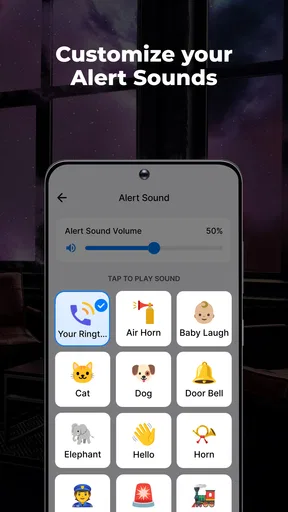
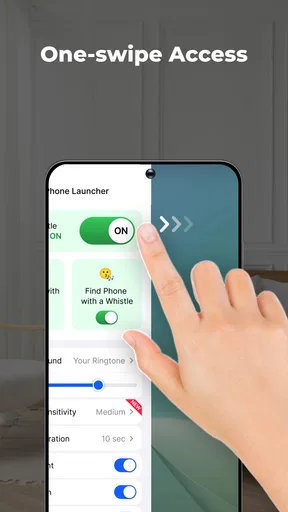
One of the standout features is the customization options. You can choose different alert sounds, from traditional ringtones to quirky sound effects. It’s a nice touch for those of us who like a bit of personality in our tech.
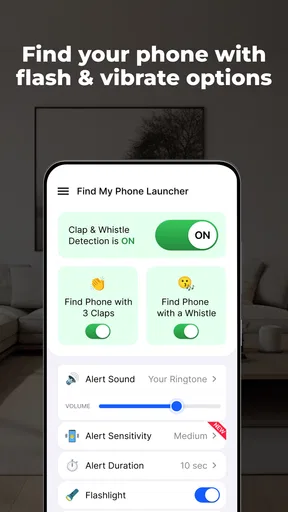
The app also allows you to adjust the sensitivity levels. This means if you’re in a noisy environment, you can tweak it to ensure it doesn’t falsely trigger. I appreciated this feature during a noisy family gathering, where the app still pinpointed my phone with precision.
For a shared household, the alert choice is more than decoration. A distinctive sound is easier to recognize than a tone that blends into other notifications or devices. I would pick something noticeable but not alarming, then keep the phone’s usual alert behavior in mind when choosing where to test it. If children borrow the phone and leave it in another room, a familiar response can make the search quicker for everyone without turning it into a complicated routine.
Where It Fits in a Daily Routine
A realistic use is the end-of-day scramble: I put my phone down while unloading shopping, then need it before leaving again. Rather than retracing every step, I can try the sound trigger from the next room and listen for the response. The payoff is not dramatic technology; it is avoiding a few minutes of opening drawers and lifting cushions. That is exactly the kind of small recurring annoyance this sort of utility can remove.
It can also suit people who move between a desk, bag, and several rooms and tend to set their phone down without a fixed place. Someone who always uses a designated charging spot may gain little from it. Likewise, if I regularly leave my phone in public places or need to locate it far away, I would use the device maker’s remote location and security tools instead. A clap-based search is most compelling when the phone is nearby and the problem is simply forgetting where it landed.
Real-World Testing
In real-world testing, I found the app’s functionality to be quite robust. Even in a crowded room, a couple of claps were enough to make my phone spring to life. The app also proved invaluable when I accidentally left my phone on silent mode. Rather than scouring every nook and cranny, a few claps had it calling out like an old friend.
However, it’s crucial to mention that the app’s effectiveness can vary based on the phone model and microphone quality. Some older models might struggle a bit, but for most modern smartphones, it’s smooth sailing.
That variation is why I would test it with the case and setup I actually use. A phone on a desk in a quiet room is a different challenge from one tucked into a bag during a busy evening. If the first test does not work consistently, I would adjust sensitivity and try again before relying on it in a hurry. This is a modest bit of preparation, but it is more useful than assuming every microphone and environment will behave alike.
How It Compares With Other Ways to Find a Phone
The usual alternatives solve different versions of the problem. Calling my own number works if another person can call and the phone can be heard, but it is awkward when I am alone or the device is silenced. Searching manually costs no setup time, yet it can turn into a room-by-room hunt. A manufacturer’s locator is the better choice for a phone left somewhere outside the house or for security actions; this app’s appeal is the quick nearby cue, not remote tracking.
That makes the app a useful extra rather than a complete plan. I would keep a remote locator available for travel and use this one for the recurring “where did I put it?” moment at home. If I only lose my phone occasionally, calling it or checking the usual spots may be enough. If I misplace it often within a familiar area, having a sound trigger ready can save repeated effort.
Who Should Consider It—and Who Might Skip It
I think this tool makes the most sense for people who often set their phone down in changing locations, live or work in a space where a short sound can be heard, and want a simple way to narrow a search. It may be especially handy when one person in a household is always borrowing the phone and leaving it somewhere unexpected. Since it is a free tools app from AtomApplications, trying it does not require paying for the basic download.
I would skip it if I need guaranteed location information, if my phone is often lost beyond earshot, or if I cannot keep a sound-triggered feature useful in my surroundings. Anyone sensitive to unexpected noises may also want to consider whether an alert from a misplaced phone would be welcome. Before making it part of a routine, I would check the app’s behavior on my own device and decide whether its response fits my home and habits.
Final Thoughts
Overall, Find My Phone by Clap Launcher is a nifty little tool that delivers on its promises. It’s not just a gimmick; it’s a genuinely useful app that can save you a lot of time and frustration. While it may not be perfect for every single phone out there, for most users, it’s a convenient solution to a common problem.
It is free, rated for Everyone, and has an average rating of 4.3 from around 7,600 ratings, with over a million installs. The current version is 1.9.0, and it runs on Android 10 or later. Those details make it easy to judge whether it is a practical fit for your device and comfort level, while the real test is whether its sound response works reliably in the places where you tend to misplace your phone.
If you’re someone who constantly misplaces their phone or wants a fun party trick, this app is worth a try. It’s lightweight, user-friendly, and brings a bit of fun back into the world of mobile gadgets. So next time your phone decides to play hide and seek, just clap your hands, and let the app do its magic.
My recommendation is straightforward: install it if your searches usually happen close by, then spend a minute testing it before you need it. Keep a remote locator as your backup for a genuinely lost device, and think of this app as a quicker way to find the phone you misplaced between one room and the next. That is a modest promise, but when it saves a frantic search on an ordinary day, it is enough.
Privacy and Permissions
See what permissions an app requests and how it handles your data.
- Location
- approximate location (network-based), precise location (GPS and network-based)
- Microphone
- record audio
- Wi-Fi connection information
- view Wi-Fi connections
- Other
- view network connections, expand/collapse status bar, control flashlight, full network access, change your audio settings, run at startup, set wallpaper, control vibration, prevent device from sleeping, Google Play license check, read Google service configuration
Verdict
Strengths of Find My Phone by Clap Launcher
- Easy to set up and use right away.
- Highly responsive to clapping sounds.
- No internet connection required.
- Minimal battery consumption.
- Customizable sensitivity settings.
Limitations of Find My Phone by Clap Launcher
- May respond to loud noises.
- Ads can be intrusive at times.
- Not effective in noisy environments.
- Limited to clapping detection only.
- No advanced security features.
Other Releases by AtomApplications
View All
QR & Barcode Scanner Launcher
Tools4.2

Brightest Flashlight Launcher
Tools4.3

2026 Calendar Launcher
Productivity4.4

Alarm Clock Launcher
Productivity4.3
Similar Picks in This Category
View All
Google LLC4.0

Gboard - the Google Keyboard
Google LLC4.5

Google Play services
Google LLC4.3

Google Play Store
Google LLC4.9

Files by Google
Google LLC4.5

SHAREit: Transfer, Share Files
Smart Media4U Technology Pte.Ltd.4.3
Frequently Asked Questions
How does Find My Phone by Clap Launcher work?
Find My Phone by Clap Launcher uses your device’s microphone to detect clapping sounds. Once you activate the app and misplace your phone, simply clap your hands, and the app will trigger an audible alert on your device. This feature is especially useful for finding your phone in cluttered or noisy environments.
Is Find My Phone by Clap Launcher compatible with all smartphones?
Find My Phone by Clap Launcher is compatible with most modern Android devices. However, it requires a working microphone and sufficient system resources to operate effectively. Users with older or less common phone models should check the app's compatibility on the Google Play Store before downloading.
Does the app drain the battery quickly?
The app is designed to run efficiently in the background, minimizing battery consumption. It activates the microphone only when necessary to detect claps. While any app that uses the microphone can have some impact on battery life, users typically find it manageable with minimal noticeable drain.
Can I customize the alert sound in Find My Phone by Clap Launcher?
Yes, Find My Phone by Clap Launcher allows users to customize the alert sound to their preference. You can choose from a variety of built-in sounds or use your own audio file, ensuring that the alert is both noticeable and personal, helping you quickly locate your device.
Is it safe to allow microphone access for this app?
The app requires microphone access to function, but it prioritizes user privacy. It only listens for clapping sounds and does not record or store any audio data. Users concerned about privacy should review the app’s permissions and privacy policy to ensure their comfort with its operations.
